
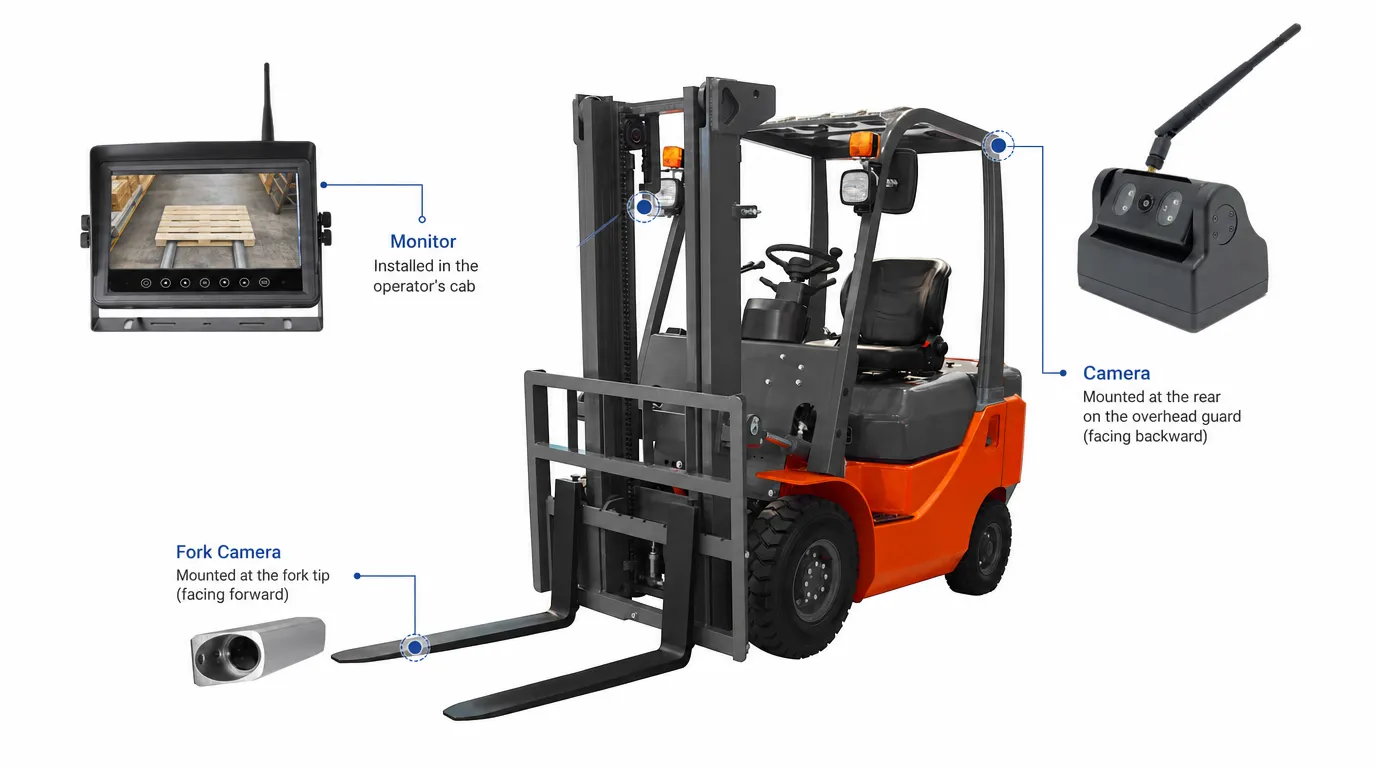
Forklift camera placement should follow the task: aligning forks with a pallet, positioning loads at height, reversing or checking side clearance. Each task calls for a different view, and one camera may not cover them all.
Start with the area the operator cannot see clearly. Then choose a mounting position that keeps that area visible during normal operation, including lifting, tilting and handling loads. Camera specifications matter, but they cannot compensate for the wrong viewing angle.
For fleet buyers, this means reviewing the proposed camera positions and monitor views before agreeing on the equipment list.
Why Forklift Camera Placement Matters
A camera may produce a sharp image yet miss the detail the operator needs. It might show the aisle ahead without showing the fork tips, or cover the area behind the forklift while leaving a rear corner outside the frame.
The same installation can also behave differently with the mast raised, an attachment fitted or a bulky load on the forks. A demonstration with an empty forklift provides only part of the picture.
Use the operating task to decide where to start:
| Operating task | Camera view to consider | What to check during a demonstration |
|---|---|---|
| Entering pallets | Front / fork view | Fork tips and pallet openings are visible at the working distance |
| Placing loads on high racks | Mast / load view | The required view remains usable at different lift heights |
| Reversing | Rear view | Coverage includes the relevant area behind the forklift |
| Turning and working near racks | Side / rear-quarter view | The view covers the side clearance or rear corner that concerns the operator |
These are starting points for planning. The final positions depend on the forklift, its attachments and the work being carried out.
Front / Fork View Camera
A fork-view camera helps the operator judge where the forks will enter a pallet. It is particularly useful when the fork tips or pallet openings are difficult to see from the seat.
For warehouse and pallet handling work, the useful image is often a close view of the contact area. The operator needs to judge alignment before moving forward, then follow the forks as they enter. Better visibility here can help avoid unnecessary contact with pallets, goods and racking.
A general front-facing camera serves a different purpose. It may show the aisle or travel path without providing enough detail for pallet entry. When comparing systems, ask the supplier to demonstrate the actual fork view.
Depending on the equipment, a suitable mounting point may be on the carriage, near the forks or on a mast section. The camera and bracket need protection from contact with pallets and loads, while keeping the required area in view.
During a trial, check the image with the pallet types and fork spacing used on site. If the forklift has a side-shift attachment, test the view throughout that movement as well. A camera position that works with one pallet or attachment may need adjustment for another.
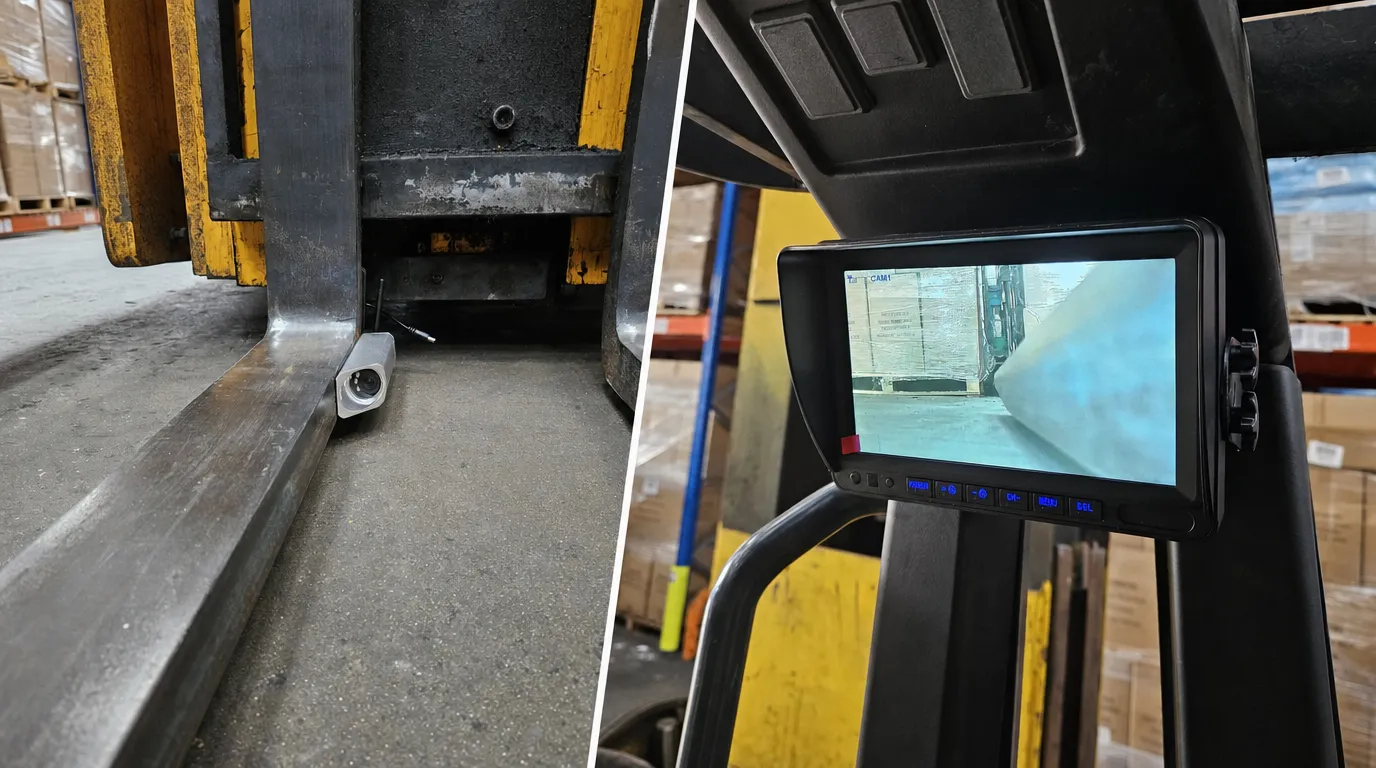
Mast Camera
A mast camera provides a view of the working area during lifting and load placement, particularly at higher rack levels.
The terms “fork view” and “mast-mounted” can overlap. Fork view describes what the operator needs to see; mast-mounted describes where the camera is installed. Depending on its position, a mast-mounted camera may also provide the fork view.
For high-rack work, the useful question is whether the operator can see the relationship between the forks, pallet and rack at the required height. A well-positioned camera gives the operator another way to check alignment from the operating position.
The mounting point affects how that view changes during lifting. A camera on a fixed mast section will not follow the load in the same way as one mounted on a moving section or carriage. Chains, hoses and crossmembers can also enter the image at certain heights.
Check the view throughout the forklift’s normal lifting and tilting range. The installer should also confirm that the bracket, camera and any cables remain clear of moving components.
For purchasing decisions, a demonstration at a representative rack height is more useful than a close-up product video recorded at ground level.
Cámara de visión trasera
A rear-view camera gives the operator an additional view behind the forklift when reversing. It is useful around loading areas, warehouse aisles and equipment where rear visibility is restricted.
Camera height and angle need to balance coverage close to the forklift with visibility farther behind it. A steep downward angle may show the nearby floor clearly but leave too little of the reversing area in view. A higher viewing angle may miss objects close to the vehicle.
Check both areas during installation.
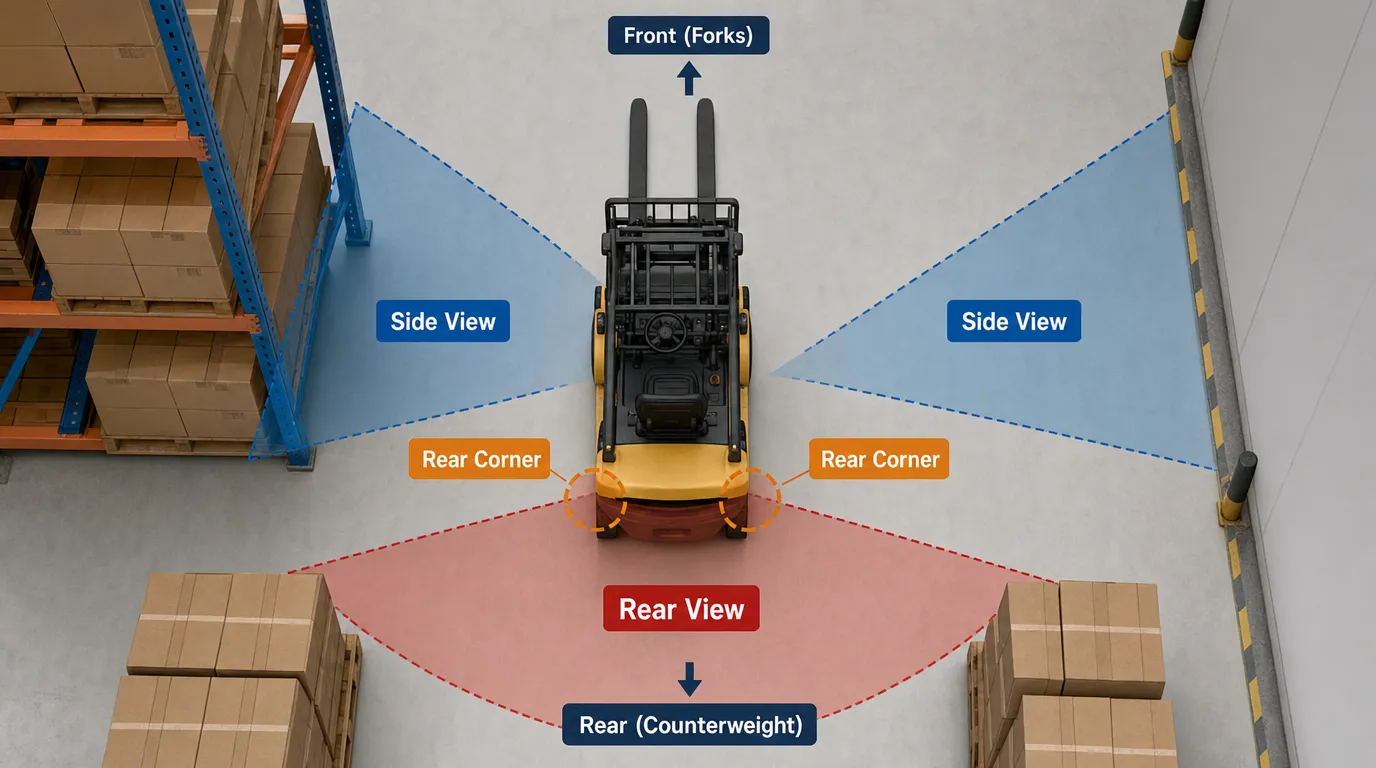
Rear swing also matters on counterbalance forklifts. As the vehicle turns, the rear can swing outward. A camera aimed directly backward may not cover both rear corners or the full area swept during a turn.
Where that is a concern, review the rear view together with side or rear-quarter coverage. Adding a camera should address a specific gap in visibility.
A conventional rear camera displays video. It does not identify pedestrians or issue person-specific warnings unless the system includes an appropriate detection function. Operators still need to follow site procedures and maintain awareness of the direction of travel.
Cámara lateral
Side cameras help operators check clearance alongside the forklift and see areas that are difficult to observe during turns.
Typical applications include narrow aisles, travel alongside racking, warehouse intersections and maneuvering near machinery. Some forklifts may need one additional side view; others may benefit from coverage on both sides.
The angle should match the task. A view along the side of the forklift may help with clearance near racks or walls. A rear-quarter view may be more useful where the main concern is the counterweight swinging outward during a turn.
Review the image through a representative maneuver, with the forklift and load in their normal working positions. This makes it easier to identify gaps that are not obvious when the vehicle is stationary.
Side cameras cannot see through racking, stacked goods or building corners. At intersections, their usefulness depends on when the camera gains a clear view of the crossing area. Site traffic arrangements and operator checks remain necessary.
Choosing the Right Monitor Layout
Camera placement and monitor layout should be planned together. The operator needs to find and interpret the relevant image quickly.
For precise fork alignment, a full-screen view may be easier to use than a small panel within a split-screen display. For general awareness around the forklift, showing several views together may be useful.
| Camera configuration | Display options to confirm | Practical consideration |
|---|---|---|
| One camera | Single full-screen view | Suitable for one priority task, such as fork alignment or rear visibility |
| Two cameras | Manual selection, split screen or compatible automatic switching | Check how the operator moves between fork and rear views |
| Three or four cameras | Multi-view display with individual full-screen selection | Confirm that important details remain visible in each panel |
These display options depend on the selected monitor. Camera quantity alone does not confirm which layouts or switching functions are available.
Automatic switching also requires compatible inputs and configuration. For example, a rear view may be selected when a supported reverse signal is received. Confirm which view takes priority and what appears when the trigger ends.
Place the monitor where it can be checked comfortably without obstructing the operator’s direct view, controls or access.
Does the System Need Recording?
Live display and recording are separate requirements. A monitor that shows several cameras does not necessarily record every channel.
If the fleet needs footage for incident review, confirm the recording channels, storage capacity, timestamps and export process. Ask whether recording is continuous, event-based or manually started.
During the trial, retrieve and play back a sample recording. This checks whether the footage is usable and whether the export process is practical for the people who will manage it.
Wired vs Wireless Forklift Camera Systems
Both wired and wireless systems can suit permanent installations. The choice depends on cable routing, camera movement, power arrangements and operating conditions.
When a Wired System Makes Sense
A wired system is a practical option where the cable route can be protected and maintained. Fixed rear or side positions may offer straightforward routing, depending on the forklift.
Moving mast and carriage installations need more planning. Cables must accommodate the required movement without becoming stretched, trapped or exposed to repeated damage.
Ask the installer to explain how the cable will be supported and protected through the full working range. Include access for inspection and replacement in that discussion.
When a Wireless System Makes Sense
Wireless video transmission can simplify installations where running a video cable is difficult, particularly around moving mast sections or on retrofit projects.
However, wireless transmission does not remove the need for power. A camera may use a rechargeable battery or an external power connection.
For battery-powered cameras, check runtime against the actual shift pattern and agree on a charging routine. For externally powered cameras, confirm how power will reach the mounting position.
Test the wireless connection on the forklift in its intended working area, including the lift heights and operating positions that matter. A short demonstration beside a stationary vehicle does not establish performance throughout the site.
Wireless is not limited to temporary work, and wired is not automatically the better choice for every permanent installation. The installation plan and site trial should guide the decision.
Forklift Camera vs AI Pedestrian Detection
A standard camera gives the operator a view. AI pedestrian detection adds a function that identifies people within the camera’s view and, where configured, triggers a warning.
The choice depends on the problem the fleet needs to address.
For pallet alignment, the priority may be a clear fork view. Where forklifts regularly operate near pedestrians, the project may also require detection coverage and audible or visual alerts.
These requirements can call for different camera positions. A camera aimed at pallet openings may provide a useful handling view while offering limited coverage of people approaching from the side. Detection zones therefore need to be planned alongside the operator’s viewing requirements.
When reviewing an AI system, confirm:
- Which cameras provide pedestrian detection
- Where detection is expected to work around the forklift
- How the operator receives the warning
- Whether external warning devices are included
- How detection zones and alert settings are configured
Performance depends on the camera position, visibility, lighting, obstructions and system setup. Pedestrian detection supports the operator; it does not guarantee that every person will be detected. Detection and warning functions should also not be confused with automatic braking.
For help matching camera coverage and warning requirements to your operation, explore our forklift safety solutions.
Check the Installation Before Equipping the Fleet
A trial installation gives the buyer, installer and operators a chance to assess the proposed setup before repeating it across the fleet.
Use a representative forklift, attachment and load. Carry out the checks in a controlled area under the site’s safety procedures.
The trial should answer a few practical questions:
- Can the operator see the required detail during pallet entry and load placement?
- Does the view remain useful through normal lifting, tilting and attachment movement?
- Are the relevant rear and side areas visible during representative maneuvers?
- Is the correct monitor view easy to select and understand?
- Does the video remain usable under the site’s normal lighting and operating conditions?
- If recording or AI alerts are included, do they work as specified?
The installer should follow the forklift and camera manufacturers’ fitting instructions and confirm that the equipment does not obstruct controls, direct visibility or moving components.
Before rollout, record the agreed mounting positions, viewing angles, cable or power arrangements and monitor settings. Note any differences between forklift models. This gives subsequent installations a clear reference and makes future maintenance easier.
Need Help Choosing Camera Placement for Your Forklift Fleet?
Tell us your forklift type, working environment and required viewing areas, and our team will recommend a suitable camera and monitor setup.
Photos of the forklift, mast, attachments and operator’s view will help us review possible mounting positions. Let us know whether the project also requires recording or pedestrian detection.