
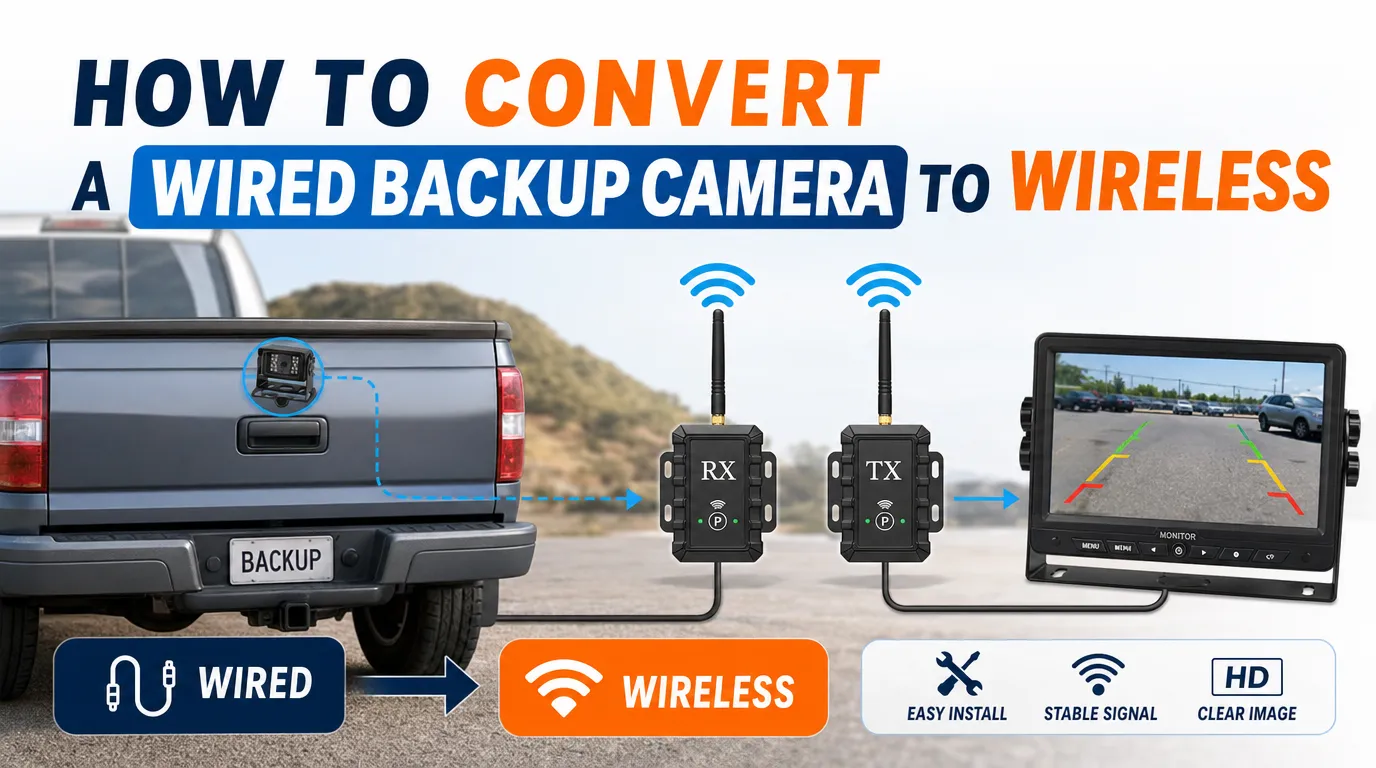
Many vehicle owners, installers, and fleet operators already have a wired backup camera system installed, but later they may want to reduce cable routing, simplify trailer connection, or make the system easier to retrofit.
So the common question is:
Can you convert a wired backup camera to wireless?
Yes, in many cases you can. The usual method is to add a wireless video transmitter and receiver kit between the rear camera and the monitor.
However, “wireless” does not mean the whole system has no wires. The camera, monitor, transmitter, and receiver still need power. In most backup camera systems, the wireless part only replaces the long video cable between the rear of the vehicle and the display monitor.
This guide explains how wired-to-wireless conversion works, what parts you need, what compatibility issues to check, and when a dedicated wireless backup camera system may be a better choice.
For a broader comparison, you can also read our guide on wired vs wireless backup camera systems.
Quick Answer: How to Convert a Wired Backup Camera to Wireless
To convert a wired backup camera system to wireless, you usually need to add a wireless video transmitter and receiver kit.
The basic connection is:
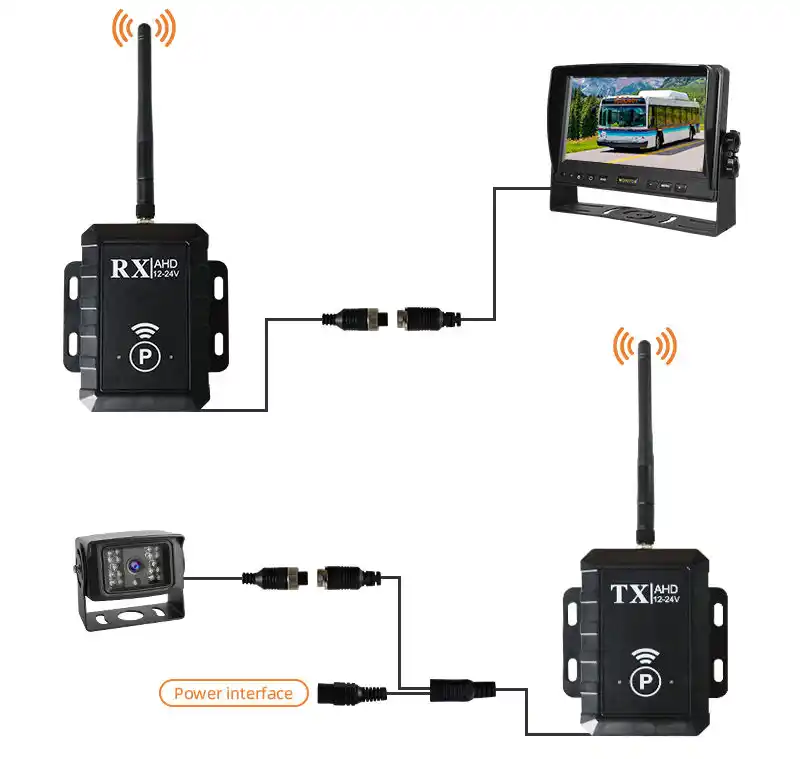
Wired backup camera → Wireless transmitter → Wireless receiver → Monitor
The camera sends the video signal to the transmitter.
The transmitter sends the video signal wirelessly to the receiver.
The receiver outputs the video signal to the monitor.
This setup can reduce the need to run a long video cable from the rear of the vehicle to the dashboard. It is especially useful for trailers, RVs, trucks, construction vehicles, agricultural machinery, and retrofit projects where cable routing is difficult.
Before converting your system, you should check the camera signal type, monitor input, connector definition, power supply, transmission distance, and installation environment.
Video Demo: Converting a Wired Backup Camera to Wireless
In this short demo, we show how a wired backup camera can be connected to a wireless transmitter and receiver kit. The camera connects to the wireless transmitter, the receiver connects to the monitor, and the image appears on the screen after power is supplied.
This type of setup can help reduce long video cable routing between the rear camera and the display monitor. However, the camera, transmitter, receiver, and monitor still need proper power connections.
The actual wiring may vary depending on the camera signal type, connector definition, power voltage, and monitor input. Before installation, always check whether the wireless transmitter and receiver support your camera format, such as CVBS, AHD 720P, or AHD 1080P.
What Does “Wireless” Really Mean in a Backup Camera System?
When people hear “wireless backup camera,” they often imagine a camera system with no cables at all. In most fixed vehicle camera systems, this is not completely true.
Usually, “wireless” means the video signal is transmitted wirelessly. The camera and monitor still need power.
A converted wireless backup camera system usually still needs:
- Power for the rear camera
- Power for the wireless transmitter
- Power for the wireless receiver
- Power for the monitor
- A short video connection from the camera to the transmitter
- A short video connection from the receiver to the monitor
So the system becomes video-wireless, not completely wire-free.
If you need a more flexible setup with less wiring, a battery-powered magnetic wireless camera may be a better option for temporary, movable, or rental applications.
Backup Camera Wireless Conversion Compatibility Checklist
Before buying a wireless transmitter and receiver kit, check these points first.
Camera video signal
The wireless kit must support the same signal type. Confirm whether your camera is CVBS, AHD 720P, AHD 1080P, TVI, or CVI.
Monitor input
The receiver output must match the monitor input. Check whether your monitor uses RCA, 4-pin aviation connector, AHD input, or CVBS input.
Camera resolution
Some wireless kits only support standard-definition video. Confirm whether your system is CVBS, 720P, or 1080P.
PAL / NTSC format
Format mismatch may cause no image or unstable image. Confirm whether your system is PAL or NTSC.
Power voltage
Camera and wireless modules need stable power. Check whether the system uses 12V, 24V, or wide voltage input.
Connector type
Connector shape does not always mean the pin definition is the same. Check whether the system uses RCA, 4-pin aviation connector, or a customized connector.
Trigger wire
Reverse display may need a trigger signal. Confirm whether the system uses reverse light trigger or manual switching.
Transmission distance
Long vehicles need stronger wireless performance. Check the vehicle length and actual signal path.
Installation environment
Metal body and interference can affect wireless signal. Pay attention to truck body, trailer, container, machinery, and other possible signal obstructions.
Waterproof protection
The rear transmitter may be exposed to water and dust. Confirm whether the transmitter will be installed indoors or outdoors.
This checklist is important because many backup camera problems are not caused by the camera itself, but by signal mismatch, wrong connector wiring, unstable power, or poor antenna position.
When Does It Make Sense to Convert a Wired Backup Camera to Wireless?
Converting a wired backup camera system to wireless can be useful in certain situations.
It may be a good idea when:
- The existing camera and monitor are still working well
- You want to avoid running a long video cable
- The vehicle is difficult to wire
- The system is used on a trailer or detachable unit
- You need a faster retrofit solution
- You want to reduce installation labor
- The vehicle layout makes cable routing complicated
- The system does not require maximum signal stability
- The camera is used occasionally instead of continuously
For example, if you already have a rear camera installed on a trailer but do not want to run a long cable all the way to the cab, a wireless transmitter and receiver can help simplify the installation.
When Is Wireless Conversion Not Recommended?
Converting a wired system to wireless is not always the best choice.
It may not be recommended when:
- The system is used every day in a demanding commercial environment
- Stable image quality is more important than easy installation
- The vehicle is very long and has many signal obstructions
- The system uses high-resolution AHD video but the wireless kit only supports CVBS
- There is strong wireless interference nearby
- The camera system is safety-critical
- You need very low-delay image transmission
- The current system already has unstable video
- The vehicle has a metal cargo box or structure that blocks wireless signals
In these cases, keeping the system wired may be more reliable.
For long-term commercial vehicles, wired systems are often preferred because they provide better signal stability and lower interference risk. If reliability is your first priority, you may want to review our backup camera systems guide.
What Parts Do You Need to Make a Wired Backup Camera Wireless?
To convert a wired backup camera system to wireless, you usually need the following parts.
1. Wireless Video Transmitter and Receiver Kit
This is the key part of the conversion.
The transmitter is installed near the rear camera.
The receiver is installed near the monitor.
The transmitter sends the video signal wirelessly to the receiver.
Before choosing a kit, confirm:
- Video format support
- Transmission distance
- Operating frequency
- Power input
- Connector type
- Waterproof level
- Antenna type
- Delay performance
- Whether it supports your camera resolution
For commercial or heavy-duty vehicles, it is better to use a vehicle-grade wireless transmitter and receiver instead of a low-cost consumer adapter.
VisionSafetys provides wireless camera system solutions for commercial vehicles, trailers, forklifts, cranes, and industrial applications.
2. Compatible Backup Camera
Your existing wired camera must be compatible with the wireless transmitter.
Check the camera output type:
- CVBS
- AHD 720P
- AHD 1080P
- TVI
- CVI
- RCA video output
- 4-pin aviation connector
- Other customized connector
This is very important. If your camera is AHD 1080P but the wireless transmitter only supports CVBS, the monitor may show no image or poor image quality.
Before conversion, always confirm whether the wireless kit supports your camera’s signal type and resolution.
3. Compatible Monitor
The monitor also needs to support the video signal output from the wireless receiver.
Check whether your monitor supports:
- CVBS
- AHD 720P
- AHD 1080P
- PAL / NTSC
- 4-pin aviation input
- RCA input
- Trigger input
If the receiver output does not match the monitor input, you may need an adapter cable or a different wireless kit.
4. Stable Power Supply
Both the transmitter and receiver need power.
Common power sources include:
- Reverse light power
- ACC power
- Vehicle battery power
- Monitor power output
- Fuse box connection
- DC 12V / 24V power source
For backup camera use, many installers connect the rear camera and transmitter to the reverse light circuit. When the vehicle shifts into reverse, the camera and transmitter power on.
For continuous rear-view monitoring, ACC power or a controlled switch may be better.
If you want the camera to work continuously, you can also read our guide on making a rear view camera always active.
5. Adapter Cables
Depending on your original camera and monitor connectors, you may need adapter cables.
Common adapter situations include:
- RCA to 4-pin aviation connector
- 4-pin aviation connector to RCA
- Power splitter cable
- Female-to-male aviation cable
- Extension cable for antenna position
- Trigger wire adapter
Do not assume all backup camera connectors are the same. Even if the connector shape looks similar, the pin definition may be different.
For commercial vehicle projects, it is always better to confirm the connector pinout before installation.
Step-by-Step: How to Convert a Wired Backup Camera System to Wireless
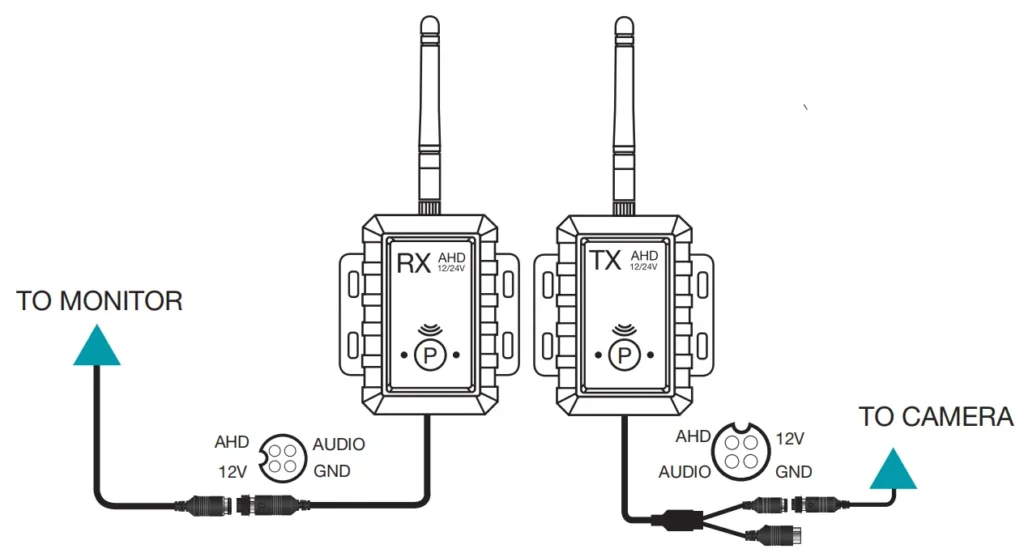
The exact wirg depends on your camera, monitor, and wireless kit, but the general process is usually as follows.
Step 1: Check Your Existing Backup Camera System
Before buying any wireless adapter, check your current wired backup camera system.
Confirm:
- Camera video signal type
- Camera resolution
- Camera connector type
- Monitor input type
- Power voltage
- PAL or NTSC system
- Whether the monitor supports AHD or only CVBS
- Whether the camera is used only in reverse or always-on mode
- Whether the monitor needs a trigger wire
This step helps avoid compatibility problems later.
Step 2: Choose the Right Wireless Transmitter and Receiver
Choose a wireless kit that matches your camera and monitor.
For example:
- If your system is CVBS, choose a wireless kit that supports CVBS.
- If your system is AHD 1080P, choose a wireless kit that supports AHD 1080P.
- If your vehicle is long, choose a kit with enough transmission range.
- If the transmitter is installed outside the vehicle, choose a waterproof or protected installation method.
For trucks, trailers, forklifts, and special vehicles, a stable digital wireless system is usually better than a low-cost analog wireless kit.
Step 3: Connect the Camera to the Wireless Transmitter
Install the wireless transmitter near the rear camera.
The connection is usually:
Camera video output → Transmitter video input
Camera power → Vehicle power or reverse light power
Transmitter power → Vehicle power or reverse light power
If the camera and transmitter are both powered by the reverse light circuit, they will only work when the vehicle is in reverse.
If you want continuous rear-view monitoring, connect them to ACC power or another controlled power source.
Make sure all wiring is protected from water, vibration, and pulling force.
Step 4: Connect the Wireless Receiver to the Monitor
Install the wireless receiver near the monitor.
The connection is usually:
Receiver video output → Monitor video input
Receiver power → Monitor power source or ACC power
If the monitor has multiple video inputs, choose the correct input channel.
If the monitor uses a trigger wire, connect the reverse trigger correctly so the screen switches to the backup camera image when the vehicle is in reverse.
Step 5: Position the Antennas Properly
Antenna position has a big effect on wireless signal stability.
For better performance:
- Keep the antenna away from thick metal parts
- Avoid placing the antenna inside a fully enclosed metal area
- Keep the transmitter and receiver antennas as visible to each other as possible
- Avoid placing the antenna close to high-power electrical equipment
- Keep the antenna away from strong interference sources
- Make sure the antenna is tightened properly
On trucks and trailers, the vehicle body, cargo box, or metal frame may block wireless signals. In that case, an external antenna or better antenna position may be needed.
Step 6: Pair the Transmitter and Receiver
Some wireless systems pair automatically. Others may require manual pairing.
After powering on the system, check whether:
- The transmitter and receiver connect successfully
- The monitor shows the rear image
- The image is stable
- There is no serious delay
- The system reconnects after power off and power on
- The image appears quickly when shifting into reverse
If pairing fails, check power, signal type, antenna position, and pairing instructions.
Step 7: Test the System in Real Driving Conditions
Do not only test the system while the vehicle is parked.
Test it in real use conditions, such as:
- Reversing
- Parking
- Trailer connection
- Engine running
- Night operation
- Long-distance signal path
- Vehicle vibration
- Different vehicle angles
- Nearby wireless devices
A system that works in a workshop may behave differently on the road, on a trailer, or at a worksite.
Special Note for AHD Backup Camera Systems
If your current wired backup camera is an AHD camera, you need to be more careful when choosing a wireless conversion kit.
Many low-cost wireless video transmitters only support CVBS analog video. If your camera outputs AHD 720P or AHD 1080P, a CVBS-only wireless transmitter may not work properly. The monitor may show no image, black screen, unstable image, or reduced image quality.
Before conversion, confirm that the wireless transmitter and receiver support the same AHD format and resolution as your camera and monitor.
For AHD 1080P systems, signal quality, power stability, antenna position, and wireless module quality are especially important.
If the wireless kit does not support AHD 1080P, it is better to choose a compatible AHD wireless solution or use a complete matched wireless camera system.
Common Mistakes When Making a Wired Backup Camera Wireless
When converting a wired backup camera system to wireless, many problems come from choosing the wrong adapter or ignoring signal compatibility.
Common mistakes include:
- Buying a CVBS wireless kit for an AHD 1080P camera
- Assuming all 4-pin aviation connectors have the same pin definition
- Powering the camera from an unstable reverse light circuit
- Installing the antenna inside a metal enclosure
- Using a low-cost consumer wireless kit for a heavy-duty truck
- Ignoring PAL / NTSC compatibility
- Expecting the system to be completely wire-free
- Not testing delay before using the system in real reversing conditions
- Installing the transmitter in a location exposed to water without protection
- Using loose adapter cables in a high-vibration vehicle
For commercial vehicles, these issues can cause no image, unstable image, delay, interference, or intermittent signal loss.
Common Problems After Converting to Wireless
After converting a wired backup camera system to wireless, some users may experience problems. Here are the most common ones.
No image on the monitor
Possible causes include no power, wrong input, signal mismatch, or pairing failure. Check power, input channel, camera format, and pairing status.
Image is unstable
Possible causes include interference, poor antenna position, or weak signal. Check antenna location, transmission distance, and metal obstruction.
Image has delay
Possible causes include wireless encoding, long distance, or low-quality wireless kit. Check delay performance and test the system in real reversing conditions.
Image quality becomes worse
Possible causes include using a CVBS-only kit with an HD camera or weak wireless signal. Check signal format and resolution support.
System works sometimes but not always
Possible causes include loose connector, unstable power, or vehicle vibration. Check power supply, grounding, and connector protection.
Image appears but trigger does not work
Possible causes include incorrect reverse trigger wiring. Check the trigger wire and monitor settings.
No Image on the Monitor
Possible causes include:
- No power to camera
- No power to transmitter
- No power to receiver
- Wrong video input selected
- Wrong connector or pin definition
- Signal format mismatch
- Pairing not completed
- Monitor does not support the camera format
Check power first, then check signal compatibility.
Image Is Unstable or Freezing
Possible causes include:
- Wireless interference
- Long transmission distance
- Poor antenna position
- Metal obstruction
- Low-quality wireless kit
- Weak power supply
- Loose connector
- Vehicle vibration
Try repositioning the antenna and reducing obstructions between transmitter and receiver.
Image Has Delay
Wireless systems may have some image delay. The delay depends on the wireless technology, encoding method, camera resolution, and signal environment.
For reversing safety, lower delay is usually better. If delay is too obvious, the system may not be suitable for your application.
Image Quality Becomes Worse
Possible causes include:
- Wireless kit does not support the original camera resolution
- AHD camera converted through a CVBS-only transmitter
- Signal compression
- Weak wireless signal
- Poor power supply
- Low-quality adapter cable
If image quality is important, choose a wireless kit that supports the correct HD video format.
System Works Sometimes but Not Always
Intermittent problems are often caused by:
- Unstable power
- Poor grounding
- Loose connectors
- Weak antenna connection
- Wireless interference
- Long distance
- Water entering connectors
For commercial vehicles, connector protection and power stability are especially important.
Wired Conversion vs Dedicated Wireless Backup Camera System
Converting an existing wired system can save cost if your camera and monitor are still usable. But it is not always the cleanest solution.
Sometimes, choosing a dedicated wireless backup camera system is better.
Convert wired system to wireless
Best for existing working camera and monitor. The main advantage is saving existing hardware, but compatibility needs to be checked carefully.
Dedicated wireless backup camera system
Best for new installation or retrofit projects. The main advantage is that the camera, monitor, and wireless module are already matched, but the replacement cost may be higher.
Battery magnetic wireless camera
Best for temporary or movable use. The main advantage is fast installation and flexible positioning, but the battery needs to be charged.
Keep wired system
Best for long-term commercial use. The main advantage is the best signal stability, but it requires more cable routing work.
If you are not sure which option is better, compare the real installation condition first. For commercial vehicles, signal reliability is often more important than reducing a few meters of wiring.
Is Wireless Conversion Good for Commercial Vehicles?
It depends on the application.
Wireless conversion may be suitable for:
- Trailers
- RVs
- Agricultural machinery
- Construction equipment
- Temporary retrofit projects
- Vehicles where cable routing is very difficult
- Applications where moderate signal delay is acceptable
Wired systems may still be better for:
- Daily-use trucks
- Buses
- Heavy-duty commercial vehicles
- Long-term fixed installations
- Safety-critical reversing
- Fleet vehicles that need stable operation every day
- Applications where image loss is unacceptable
For commercial vehicle fleets, the best solution is not always the easiest installation. The best solution is the one that provides stable performance in real daily use.
Can You Make a Backup Camera Completely Wire-Free?
In a fixed vehicle system, usually no.
A standard wireless backup camera still needs power. The camera may not need a long video cable, but it still needs a power source.
If you want a system with the least wiring, you may consider a battery-powered magnetic wireless camera. This type of system usually includes:
- Built-in rechargeable battery
- Magnetic mounting base
- Wireless video transmission
- Portable monitor
- Flexible camera position
This is useful for trailers, forklifts, construction machinery, temporary reversing, and vehicles where drilling or wiring is not preferred.
However, battery-powered systems require charging and may not be ideal for every continuous-use application.
How to Choose the Right Wireless Conversion Solution
Before converting your wired backup camera system to wireless, ask these questions:
- What video signal does my camera output?
- Does the wireless kit support my camera resolution?
- What input does my monitor support?
- Is the system CVBS, AHD, TVI, or another format?
- How far is the camera from the monitor?
- Are there metal walls, cargo boxes, or vehicle structures blocking the signal?
- Is the vehicle used daily or occasionally?
- Is this for private use, trailer use, or commercial fleet use?
- Does the camera need to work only in reverse or continuously?
- Is image stability more important than installation convenience?
- Does the transmitter need waterproof protection?
- Does the system need a reverse trigger?
- Will the vehicle operate in an environment with strong wireless interference?
If you can answer these questions clearly, it will be much easier to choose the right solution.
VisionSafetys Wireless Backup Camera Solutions
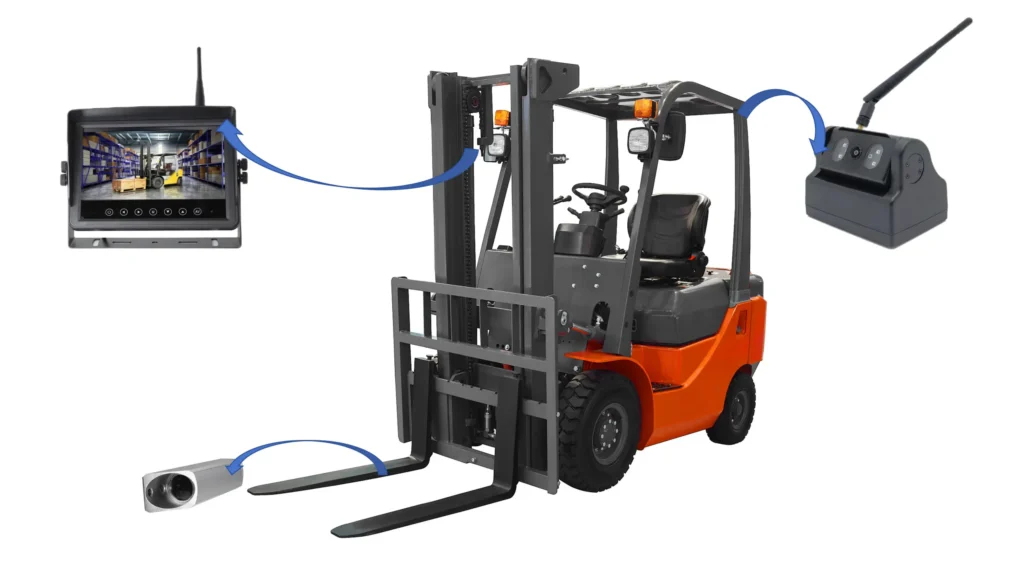
VisionSafetys provides vehicle camera systems for trucks, buses, forklifts, construction vehicles, trailers, RVs, and other commercial vehicle applications.
Our wireless camera system options include:
- Wireless backup camera systems
- Wireless monitor and camera kits
- Magnetic battery wireless cameras
- Wireless transmitter and receiver solutions
- Crane camera systems
- Forklift wireless camera systems
- Commercial vehicle rear-view camera systems
For customers who already have a wired backup camera system, we can help check whether a wireless conversion solution is possible based on the camera signal, monitor input, connector type, voltage, transmission distance, and installation environment.
If a conversion is not the best option, we can also recommend a complete wireless camera system or battery-powered magnetic camera solution.
Explore our wireless camera system solutions or contact VisionSafetys for a suitable configuration.
FAQ
Can I convert a wired backup camera to wireless?
Yes. In many cases, you can convert a wired backup camera to wireless by adding a wireless video transmitter and receiver between the camera and the monitor. However, the camera and monitor still need power.
Do I still need wires after converting to wireless?
Yes. The video signal can be transmitted wirelessly, but the camera, transmitter, receiver, and monitor still need power connections.
Will a wireless transmitter work with any backup camera?
Not always. You need to check the camera signal type, resolution, connector, and monitor input. For example, an AHD 1080P camera may not work with a wireless transmitter that only supports CVBS.
Can I use a wireless transmitter with an AHD backup camera?
Yes, but only if the wireless transmitter and receiver support the same AHD format and resolution as your camera and monitor. If the wireless kit only supports CVBS, it may not work properly with an AHD 720P or AHD 1080P camera.
Is wireless backup camera conversion reliable?
It can be reliable in the right environment, but wireless systems are more affected by distance, interference, antenna position, and obstructions. For demanding commercial vehicles, wired systems are often more stable.
What is the easiest way to make a backup camera wireless?
The easiest way is to use a matched wireless transmitter and receiver kit. For temporary use, a battery-powered magnetic wireless camera may be even easier because it reduces wiring and mounting work.
Can I use a wireless backup camera on a trailer?
Yes. Wireless backup cameras are commonly used on trailers because they reduce the need for long cable runs between the trailer and the towing vehicle. However, transmission distance and signal obstruction should be checked carefully.
Is a wired or wireless backup camera better?
A wired backup camera is usually better for signal stability and long-term fixed installation. A wireless backup camera is usually better for faster installation and reduced cable routing. The better choice depends on your vehicle and use case.
Why does my wireless backup camera have delay?
Delay can be caused by wireless encoding, long transmission distance, interference, camera resolution, or low-quality wireless modules. Before using a wireless system for reversing, it is important to test the delay in real driving conditions.
What should I check before buying a wireless backup camera adapter?
Check the camera video format, monitor input, connector type, voltage, transmission distance, antenna position, waterproof requirements, and whether the adapter supports your camera resolution.
Schlussfolgerung
Converting a wired backup camera system to wireless is possible, but it requires the right wireless transmitter and receiver, compatible video signal, stable power supply, proper connector wiring, and suitable antenna positioning.
For trailers, RVs, temporary setups, and vehicles where cable routing is difficult, wireless conversion can be a practical way to reduce wiring work. For daily-use commercial vehicles and heavy-duty applications, a wired system may still be the better choice when maximum signal stability is required.
Before making the change, check your camera signal type, monitor input, power supply, connector definition, transmission distance, and real installation environment. If the conversion is not suitable, a dedicated wireless backup camera system or battery-powered magnetic camera may provide a cleaner and more reliable solution.
If you need help choosing between wired conversion, wireless backup camera systems, or magnetic battery camera solutions, contact VisionSafetys for a recommended configuration.

 German
  English
  Spanish
  Japanese
  Arabic
  Dutch
Dutch